WebSocket Callbacks
New in Dash 4.2
Dash callbacks typically run over HTTP: inputs are sent to the server, the callback executes, and outputs are returned once complete. WebSocket callbacks use a persistent connection, allowing the server to push updates incrementally and query client state while the callback is still running.
WebSocket callbacks require a FastAPI or Quart backend. See Server Backends for setup instructions.
Use WebSocket callbacks when you need continuous updates or mid-execution interaction with the UI. Typical use cases include live data streams, progress indicators for long-running tasks, adaptive workflows that depend on current UI state, and real-time log or event display.
Enabling WebSocket Callbacks
To enable WebSocket callbacks for all the callbacks in an app, add websocket_callbacks=True to the Dash constructor:
app = Dash(backend="fastapi", websocket_callbacks=True)
Alternatively, you can enable them on specific callbacks with websocket=True. See Per-Callback WebSocket below.
Streaming Updates with set_props
Within a WebSocket callback, set_props sends updates immediately instead of waiting for the final return value. This allows multiple UI updates during a single execution.
import asyncio
from dash import Dash, html, dcc, callback, Input, Output, set_props

app = Dash(backend="fastapi", websocket_callbacks=True)

app.layout = html.Div([
    html.Button("Start Countdown", id="start-btn"),
    html.Div(id="countdown-display", children="Ready"),
])

@callback(
    Output("countdown-display", "children"),
    Input("start-btn", "n_clicks"),
    prevent_initial_call=True,
)
async def countdown(n_clicks):
    for i in range(10, 0, -1):
        set_props("countdown-display", {"children": f"Countdown: {i}"})
        await asyncio.sleep(1)
    return "Done!"

if __name__ == "__main__":
    app.run(debug=True)
The callback can stream intermediate values and still return a final state at completion.
Reading Props with get_prop
Access the WebSocket interface via ctx.websocket. Use get_prop to retrieve the current value of a component property from the browser.
import asyncio
from dash import Dash, html, dcc, callback, ctx, Input, Output, set_props

app = Dash(backend="fastapi", websocket_callbacks=True)

app.layout = html.Div([
    dcc.Input(id="name-input", placeholder="Type your name..."),
    html.Button("Start Greeting", id="greet-btn"),
    html.Div(id="greeting-output"),
])

@callback(
    Output("greeting-output", "children"),
    Input("greet-btn", "n_clicks"),
    prevent_initial_call=True,
)
async def greet(n_clicks):
    ws = ctx.websocket
    # Read the current value of the input at the moment the user clicks
    name = await ws.get_prop("name-input", "value")
    set_props("greeting-output", {"children": f"Processing for {name}..."})
    await asyncio.sleep(2)
    return f"Hello, {name}!"

if __name__ == "__main__":
    app.run(debug=True)
This avoids declaring the property as State when the value may change during execution.
Per-Callback WebSocket
You can enable WebSocket transport on specific callbacks only:
import asyncio
from dash import Dash, html, dcc, callback, Input, Output, set_props

app = Dash(backend="fastapi")

app.layout = html.Div([
    html.Button("Stream Updates", id="stream-btn"),
    html.Div(id="stream-output", children="Waiting..."),
    dcc.Dropdown(
        id="my-dropdown",
        options=["Option A", "Option B", "Option C"],
        value="Option A",
    ),
    html.Div(id="dropdown-output"),
])

# This callback uses WebSocket for streaming updates
@callback(
    Output("stream-output", "children"),
    Input("stream-btn", "n_clicks"),
    prevent_initial_call=True,
    websocket=True,
)
async def stream_updates(n_clicks):
    for i in range(1, 6):
        set_props("stream-output", {"children": f"Update {i} of 5..."})
        await asyncio.sleep(1)
    return "All updates complete!"

# This callback uses the standard HTTP request/response
@callback(
    Output("dropdown-output", "children"),
    Input("my-dropdown", "value"),
)
def update_dropdown(value):
    return f"Selected: {value}"

if __name__ == "__main__":
    app.run(debug=True)
Callbacks without websocket=True continue to use HTTP.
Persistent Callbacks
Standard callbacks run in response to user actions and show an “Updating…” indicator in the browser title while executing. This works well for discrete interactions, but some callbacks need to run continuously with no user-triggered input and no specific output (for example, pushing live data to a dashboard). A regular callback with no inputs would still fire once on load and display the loading state, which is misleading when the callback is meant to run indefinitely in the background.
The persistent=True flag solves this. A persistent callback:
- Starts automatically when the client connects and runs for the entire session.
- Doesn’t show a loading state. The browser title stays clean because there is no request/response cycle to track.
- Requires no
InputorOutput. Useset_propsto push updates andws.get_propto read UI state. - Stops when the client disconnects.
ws.is_shutdownbecomesTruewhen the tab is closed or connectivity is lost.
@callback(persistent=True)
async def background_loop():
    ws = ctx.websocket
    while not ws.is_shutdown:
        set_props("live-display", {"children": get_latest_data()})
        await asyncio.sleep(0.5)
Use persistent callbacks when you want the server to push updates continuously without waiting for user interaction (typical use cases include live dashboards, simulations, and real-time data feeds).
Real-Time Data Streaming
WebSocket callbacks support long-running loops that both push updates and read UI state.
import asyncio
import random
from dash import Dash, html, dcc, callback, ctx, Input, Output, Patch, set_props

app = Dash(backend="fastapi", websocket_callbacks=True)

app.layout = html.Div([
    dcc.Store(id="prices-store", data={}),
    dcc.Dropdown(
        id="symbol-select",
        options=["AAPL", "GOOGL", "MSFT"],
        value="AAPL",
    ),
    html.Div(id="live-price"),
    html.Div(id="status", children="Disconnected"),
    html.Button("Connect", id="connect-btn"),
])

@callback(
    Output("status", "children"),
    Input("connect-btn", "n_clicks"),
    prevent_initial_call=True,
)
async def stream_prices(n_clicks):
    ws = ctx.websocket
    if ws is None:
        return "No WebSocket"

    set_props("status", {"children": "Connected"})

    try:
        while True:
            # Simulate incoming price data
            for symbol in ["AAPL", "GOOGL", "MSFT"]:
                price = round(100 + random.random() * 50, 2)
                patched = Patch()
                patched[symbol] = price
                set_props("prices-store", {"data": patched})

            # Read which symbol the user has selected right now
            selected = await ws.get_prop("symbol-select", "value")
            if selected:
                prices = await ws.get_prop("prices-store", "data")
                if prices and selected in prices:
                    set_props("live-price", {
                        "children": f"{selected}: ${prices[selected]}"
                    })

            await asyncio.sleep(1)
    except asyncio.CancelledError:
        # Dash cancels running callbacks on disconnect. Catching the
        # exception is optional but lets you run cleanup logic.
        pass

    return "Disconnected"

if __name__ == "__main__":
    app.run(debug=True)
Common patterns:
- Handle
asyncio.CancelledErrorto exit cleanly on disconnect. - Use
Patch()for incremental updates to stores. - Call
ws.get_propto adapt behavior based on current UI state.
External WebSocket Integration
A callback can connect to an external WebSocket service and forward data to the client.
Typical flow:
- Trigger callback from user input.
- Inside the callback, open a connection to the external service with a WebSocket client library such as websockets.
- Receive messages and stream them via
set_props. - Use
get_propto adjust requests dynamically. - Handle disconnect via cancellation.
import asyncio
import websockets
from dash import callback, ctx, set_props, Input, Output

@callback(
    Output("status", "children"),
    Input("connect-btn", "n_clicks"),
    prevent_initial_call=True,
)
async def stream_from_service(n):
    ws = ctx.websocket
    if ws is None:
        return "WebSocket not available"

    set_props("status", {"children": "Connecting..."})

    try:
        async with websockets.connect("wss://example.com/feed") as upstream:
            set_props("status", {"children": "Connected"})

            while True:
                symbol = await ws.get_prop("symbol-select", "value")
                await upstream.send(symbol)

                message = await upstream.recv()
                set_props("live-output", {"children": message})

                await asyncio.sleep(1)

    except asyncio.CancelledError:
        pass

    return "Disconnected"
Dash does not provide an upstream client. Use an async-compatible library such as websockets.
Migrating from dcc.Interval
If you have an app that uses dcc.Interval for live updates, switching to a persistent WebSocket callback removes the polling overhead and gives you server-push instead of client-pull.
Before: polling with dcc.Interval
from dash import Dash, dcc, html, Input, Output, callback

app = Dash()

app.layout = html.Div([
    html.H4("Live Price"),
    html.Div(id="price-display"),
    dcc.Interval(id="poll", interval=1000, n_intervals=0),
])

@callback(Output("price-display", "children"), Input("poll", "n_intervals"))
def update_price(n):
    price = get_latest_price("AAPL")
    return f"AAPL: ${price}"
With this pattern, the browser sends a request every second regardless of whether new data is available. If get_latest_price takes longer than the interval, updates can stall or queue up.
After: server-push with a persistent callback
import asyncio
from dash import Dash, html, callback, ctx, set_props

app = Dash(backend="fastapi", websocket_callbacks=True)

app.layout = html.Div([
    html.H4("Live Price"),
    html.Div(id="price-display"),
])

@callback(persistent=True)
async def stream_price():
    ws = ctx.websocket
    while not ws.is_shutdown:
        price = get_latest_price("AAPL")
        set_props("price-display", {"children": f"AAPL: ${price}"})
        await asyncio.sleep(1)
The dcc.Interval component is gone. The server pushes updates when they’re ready, and the update frequency is controlled by asyncio.sleep rather than a fixed polling interval. If get_latest_price is slow, the next update simply waits until it finishes rather than queuing a backlog of requests.
Key differences:
dcc.Interval |
Persistent WebSocket callback | |
|---|---|---|
| Direction | Client pulls (HTTP request each interval) | Server pushes over open connection |
| Trigger | Input("interval", "n_intervals") |
Starts automatically on page load |
| Outputs | Output(...) with return |
set_props() (no Output needed) |
| Read UI state | Declare as State(...) |
await ws.get_prop(...) mid-loop |
| Frequency control | interval prop (ms) |
await asyncio.sleep() |
| Backend | Any (Flask default) | FastAPI or Quart required |
| Slow callbacks | Stalls or queues requests | Next update waits naturally |
dcc.Interval is still the best choice for apps that don’t need a FastAPI or Quart backend, or for infrequent updates (every 30 seconds or more) where polling overhead is negligible.
Examples
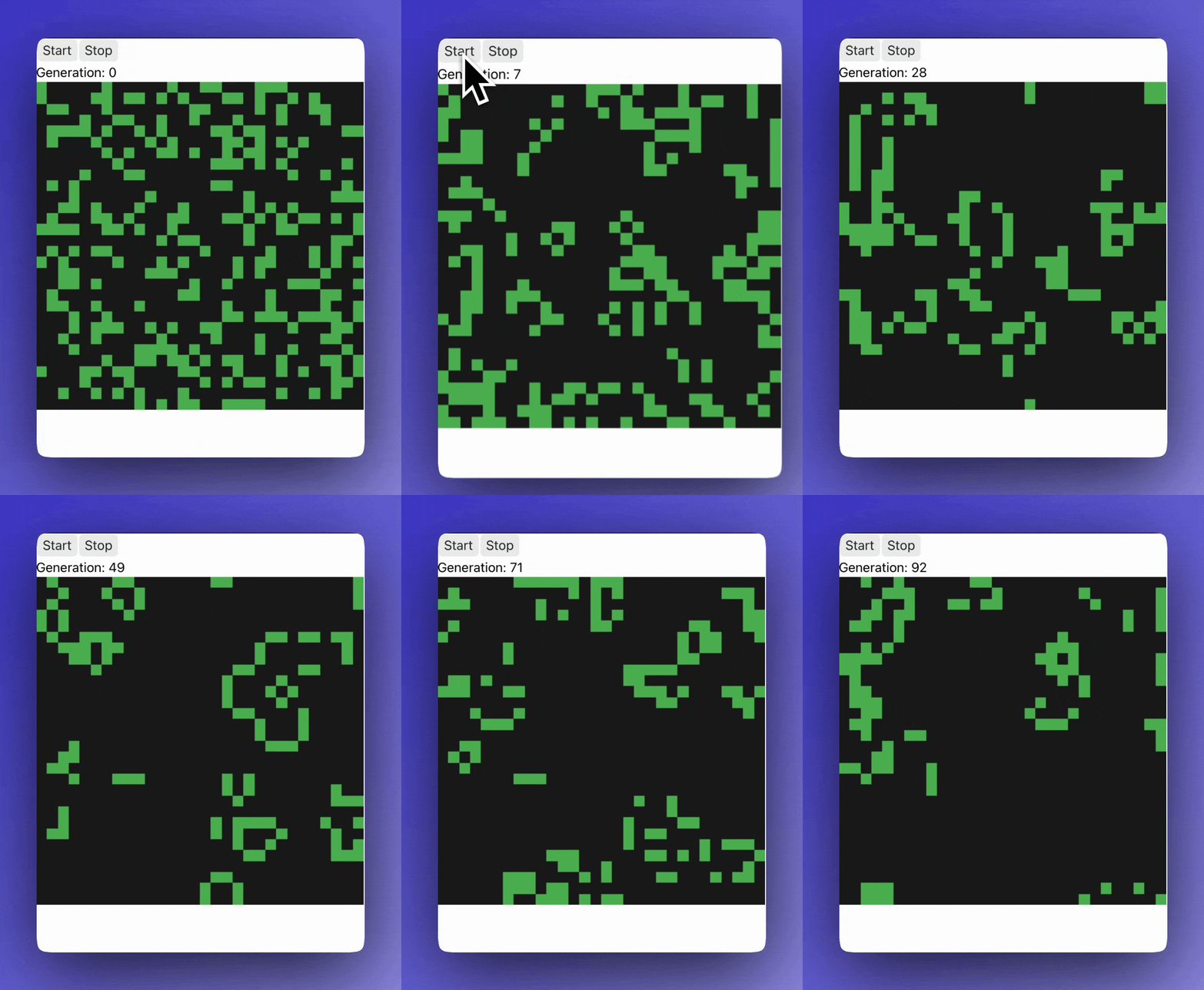
Game of Life
A persistent callback computes and streams successive states of a grid at a fixed frame rate.
import asyncio
import numpy as np
from dash import Dash, html, dcc, callback, ctx, Input, Output, set_props

app = Dash(backend="fastapi", websocket_callbacks=True)

SIZE = 30

def step(g):
    neighbors = sum(
        np.roll(np.roll(g, i, 0), j, 1)
        for i in (-1, 0, 1) for j in (-1, 0, 1) if (i, j) != (0, 0)
    )
    return (neighbors == 3) | (g & (neighbors == 2))

def make_figure(g):
    return {
        "data": [{"type": "heatmap", "z": g.astype(int).tolist(),
                   "colorscale": [[0, "#1a1a1a"], [1, "#4CAF50"]],
                   "showscale": False}],
        "layout": {"height": 400, "width": 400,
                   "margin": {"l": 0, "r": 0, "t": 0, "b": 0},
                   "xaxis": {"visible": False, "scaleanchor": "y"},
                   "yaxis": {"visible": False, "autorange": "reversed"}},
    }

initial_grid = np.random.random((SIZE, SIZE)) < 0.3

app.layout = html.Div([
    html.Button("Start", id="start"), html.Button("Stop", id="stop"),
    html.Div(id="gen", children="Generation: 0"),
    dcc.Graph(id="board", figure=make_figure(initial_grid),
              config={"displayModeBar": False, "staticPlot": True}),
    dcc.Store(id="running", data=False),
])

@callback(Output("running", "data"),
          Input("start", "n_clicks"), Input("stop", "n_clicks"),
          prevent_initial_call=True)
def controls(start, stop):
    return ctx.triggered_id == "start"

@callback(persistent=True)
async def run_game():
    ws = ctx.websocket
    grid = np.random.random((SIZE, SIZE)) < 0.3
    generation = 0
    while not ws.is_shutdown:
        running = await ws.get_prop("running", "data")
        if running:
            grid = step(grid)
            generation += 1
            set_props("board", {"figure": make_figure(grid)})
            set_props("gen", {"children": f"Generation: {generation}"})
            await asyncio.sleep(0.1)
        else:
            await asyncio.sleep(0.2)

if __name__ == "__main__":
    app.run(debug=True)
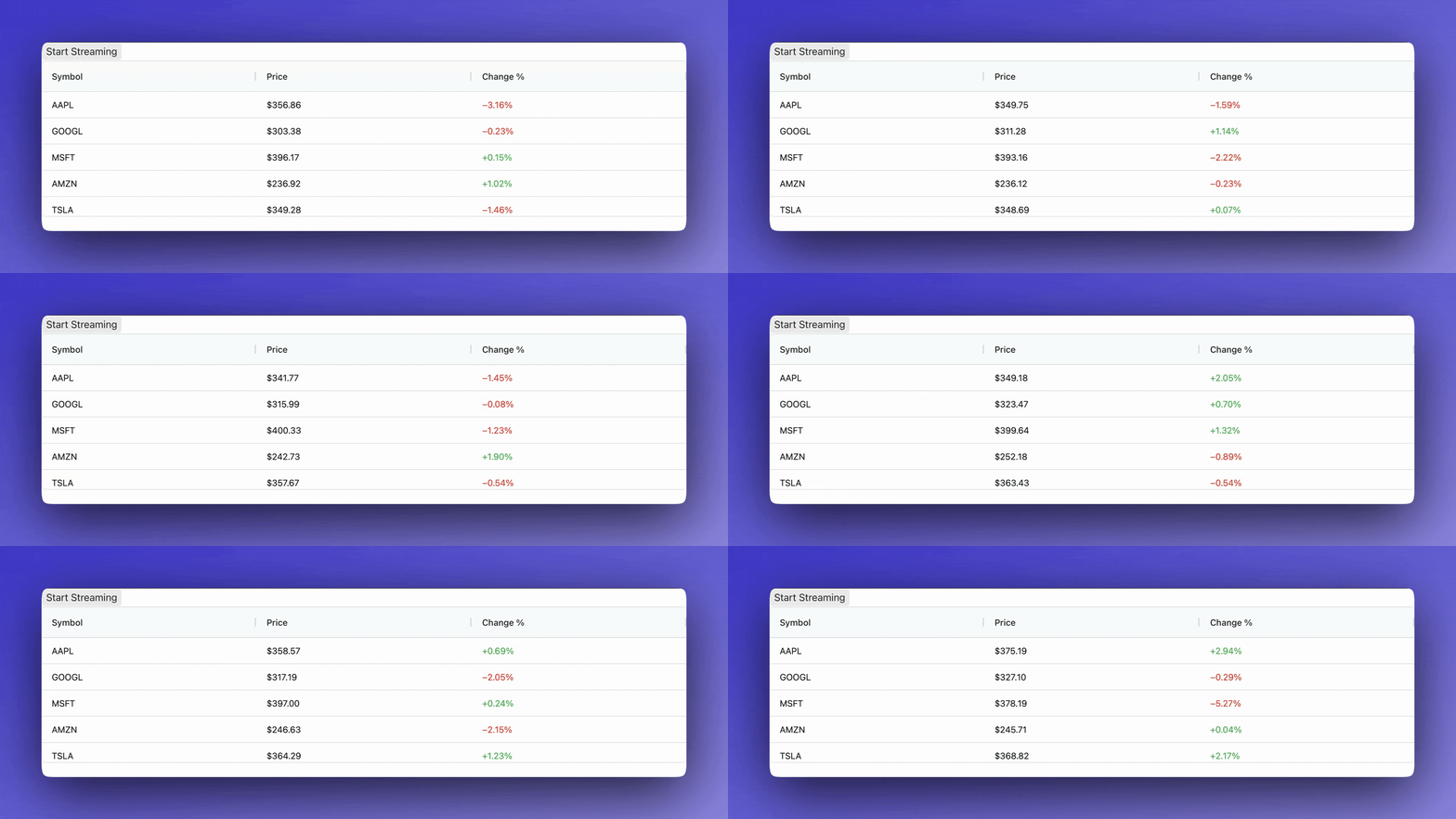
Streaming into AG Grid
A persistent callback streams live price updates into a grid, updating rows in place.
import asyncio
import random
from dash import Dash, dcc, html, callback, ctx, Input, Output, set_props
import dash_ag_grid as dag

app = Dash(backend="fastapi", websocket_callbacks=True)

columns = [
    {"field": "symbol", "headerName": "Symbol", "flex": 1},
    {"field": "price", "headerName": "Price", "flex": 1,
     "valueFormatter": {"function": "d3.format('$.2f')(params.value)"}},
    {"field": "change", "headerName": "Change %", "flex": 1,
     "valueFormatter": {"function": "d3.format('+.2f')(params.value) + '%'"},
     "cellStyle": {"function":
         "params.value >= 0 ? {'color': '#4CAF50'} : {'color': '#f44336'}"}},
]

SYMBOLS = ["AAPL", "GOOGL", "MSFT", "AMZN", "TSLA"]
initial_prices = {s: round(random.uniform(100, 500), 2) for s in SYMBOLS}
initial_rows = [
    {"symbol": s, "price": initial_prices[s], "change": 0.0}
    for s in SYMBOLS
]

app.layout = html.Div([
    html.Button("Start Streaming", id="start"),
    dcc.Store(id="streaming", data=False),
    dag.AgGrid(id="grid", columnDefs=columns, rowData=initial_rows,
               style={"height": "250px"},
               dashGridOptions={"animateRows": True}),
])

@callback(Output("streaming", "data"), Input("start", "n_clicks"),
          prevent_initial_call=True)
def toggle(n):
    return n % 2 == 1

@callback(persistent=True)
async def stream_prices():
    ws = ctx.websocket
    prices = {row["symbol"]: row["price"] for row in initial_rows}
    while not ws.is_shutdown:
        streaming = await ws.get_prop("streaming", "data")
        if streaming:
            rows = []
            for sym in SYMBOLS:
                change = round(random.gauss(0, 1.5), 2)
                prices[sym] = round(prices[sym] * (1 + change / 100), 2)
                rows.append({
                    "symbol": sym,
                    "price": prices[sym],
                    "change": change,
                })
            set_props("grid", {"rowData": rows})
            await asyncio.sleep(0.5)
        else:
            await asyncio.sleep(0.2)

if __name__ == "__main__":
    app.run(debug=True)
Security
Origin Validation
WebSocket connections are restricted to the same origin by default. Add allowed origins explicitly when embedding:
app = Dash(
    backend="fastapi",
    websocket_callbacks=True,
    websocket_allowed_origins=["https://embedding-site.example.com"],
)
Secure Transport
When your app is served over HTTPS, WebSocket connections automatically upgrade to wss:// (the encrypted WebSocket protocol), so data in transit is protected by the same TLS certificate. No additional configuration is required.
Cross-site Scripting (XSS) Protection
Component prop updates sent via set_props are sanitized before rendering, so it is not possible for attackers to execute maliciously injected code in your app.
Input Validation
Always make sure that your app code validates all inputs used in database queries, shell commands, or external systems. Use parameterized queries.
Server-Initiated Disconnect
Use ws.close() inside a callback to forcibly disconnect a client (for example, when detecting suspicious input patterns, after a session has been revoked, or when enforcing rate limits). See Handling Disconnections for details.
Deployment
Plotly Cloud detects WebSocket callbacks automatically and configures the server for you. No additional setup is needed.
For self-managed deployments, WebSocket callbacks require a server that supports the WebSocket protocol. When deploying with uvicorn, install it with the standard extra to include a WebSocket implementation:
# requirements.txt
dash[fastapi]>=4.2
uvicorn[standard]
Without uvicorn[standard], the app will start and serve pages over HTTP, but WebSocket connections will silently fail. You will see "No supported WebSocket library detected" in the server logs.
A typical Procfile for Dash Enterprise:
web: uvicorn app:app.server --host 0.0.0.0 --port $PORT
Connection Limits and Scaling
How a WebSocket callback scales depends on whether you define it with async def or def.
async def callbacks run on the event loop. They run as tasks on the connection’s event loop, not on a thread, and yield the loop whenever they await. A single worker can serve many concurrent connections, at roughly the memory cost of a coroutine. This makes async def the best choice for persistent and long-running callbacks.
def callbacks run on a shared thread pool. Each occupies one thread while it executes and releases it on return. The pool is shared across all connections and sized by websocket_max_workers (default 4); when every worker is busy, further sync callbacks queue. Raise it if you rely on sync callbacks and see them queueing.
app = Dash(backend="fastapi", websocket_callbacks=True, websocket_max_workers=8)
A synchronous persistent callback (persistent=True with no Output) would hold a thread for the whole session and can exhaust the pool, so Dash emits a RuntimeWarning when you register one. Make it async def instead.
For higher concurrency, deploy multiple workers behind a load balancer; each has its own event loop and thread pool.
Handling Disconnections
Disconnections can be initiated by the client (tab closed, navigation, lost connectivity) or by the server (calling ws.close()). In both cases, your callback needs to detect the disconnect and clean up.
For persistent callbacks, check ws.is_shutdown in their loop condition. When the connection closes, ws.is_shutdown becomes True and the loop exits:
@callback(persistent=True)
async def background_loop():
    ws = ctx.websocket
    while not ws.is_shutdown:
        set_props("output", {"children": get_data()})
        await asyncio.sleep(1)
    # Connection closed -- clean up resources here
Event-triggered callbacks (those with Input) receive an asyncio.CancelledError when the connection closes. Catch it to run cleanup logic:
@callback(Output("status", "children"), Input("btn", "n_clicks"),
          prevent_initial_call=True)
async def long_task(n):
    try:
        while True:
            set_props("progress", {"children": "Working..."})
            await asyncio.sleep(1)
    except asyncio.CancelledError:
        # Client disconnected -- clean up resources here
        pass
    return "Done"
Server-initiated disconnect uses ws.close() to end the connection programmatically. The callback can continue running after calling close() to perform cleanup, but no further updates will reach the client:
if suspicious_activity:
    await ws.close(code=4001, reason="Policy violation")
Constructor Parameters
| Parameter | Type | Default | Description |
|---|---|---|---|
websocket_callbacks |
bool |
False |
Enable WebSocket transport globally. |
websocket_allowed_origins |
list[str] |
[] |
Additional allowed origins. |
websocket_inactivity_timeout |
int |
300000 |
Idle timeout in milliseconds. |
websocket_max_workers |
int |
4 |
Worker threads in the shared pool for synchronous WebSocket callbacks. Async callbacks run on the event loop and don’t use this pool. |
API Reference
ctx.websocket returns the WebSocket interface when running over WebSocket, otherwise None.
ws.is_shutdown is True when the WebSocket connection has closed (tab closed, navigation, or lost connectivity). Check this in long-running loops to exit cleanly.
ws.close(code=1000, reason="Connection closed") closes the WebSocket connection from the server side. Use this to forcibly disconnect a client, for example on suspicious activity, session revocation, or policy violation.
ws.get_prop(component_id, prop_name, timeout=30.0) asynchronously retrieves the current value of a component property from the client.
Use set_props to send updates. In WebSocket callbacks, updates are streamed immediately.