Shared Storage
New in Dash 4.5
Shared storage allows callbacks in your apps to share state without global variables or external services.
Shared storage has two main concepts:
* Key-value storage: get, set, and delete values that any callback in any worker process can read.
* Publish/subscribe: publish a message to a topic, and any callback subscribed to that topic receives it.
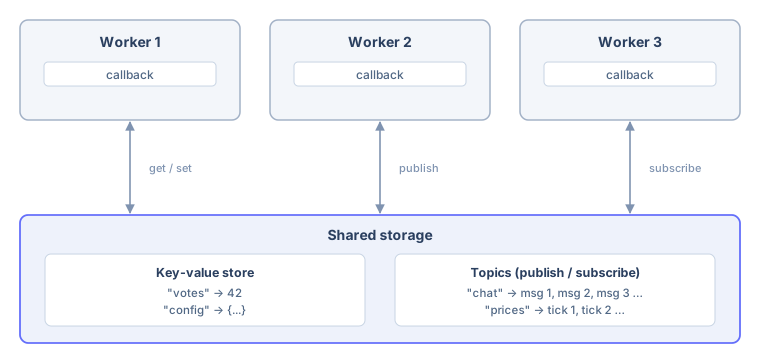
This is what a module-level global variable can’t do. Each worker process gets its own copy of a global, so a value one worker writes is invisible to the next request if it lands elsewhere. Shared storage gives every worker one view of the same data. See Sharing Data Between Callbacks for more on why global variables break Dash apps.
Note: Shared storage is server-side state shared by everyone using your app. It’s not a per-user session store. For data that belongs to one user, use dcc.Store or key your shared storage entries by a user or session identifier.
Enabling Shared Storage
Shared storage is off by default. To turn it on, pass a backend to the shared_storage parameter when you create your app:
from dash import Dash, LocalSharedStorage

app = Dash(shared_storage=LocalSharedStorage())
LocalSharedStorage keeps data in memory and shares it between worker processes on one machine. To store data on disk or share it across hosts, use one of the other backends.
You can also choose a backend with the DASH_SHARED_STORAGE environment variable instead of changing your app’s code. Set it to local for LocalSharedStorage, to diskcache:///absolute/path for DiskcacheSharedStorage, or to a redis:// or rediss:// URL for RedisSharedStorage. When the variable is unset, empty, or set to none, shared storage stays off. A shared_storage argument in your code, including shared_storage=None, always takes precedence over the environment variable.
Shared storage starts lazily, the first time something uses it. In an app without shared storage, a callback that uses ctx.shared_storage raises an error.
Streaming callbacks that run over HTTP also require shared storage. If your app has them, enable shared storage even if your callbacks never use ctx.shared_storage directly.
Accessing Shared Storage
Inside a callback, use dash.ctx.shared_storage. Outside a callback (at app startup or in a background thread, for example), use app.shared_storage.
from dash import Dash, Input, LocalSharedStorage, Output, callback, ctx, html

app = Dash(shared_storage=LocalSharedStorage())

app.layout = html.Div([
    html.Button("Add Vote", id="vote-btn"),
    html.Button("Refresh Total", id="refresh-btn"),
    html.Div(id="my-view"),
    html.Div(id="shared-total"),
])

@callback(
    Output("my-view", "children"),
    Input("vote-btn", "n_clicks"),
    prevent_initial_call=True,
)
def add_vote(n_clicks):
    total = ctx.shared_storage.get("votes", 0) + 1
    ctx.shared_storage.set("votes", total)
    return f"You voted. Total is now {total}."

# A different callback, and a different request, reads the same value.
@callback(
    Output("shared-total", "children"),
    Input("refresh-btn", "n_clicks"),
    prevent_initial_call=True,
)
def read_total(n_clicks):
    return f"Votes across all sessions: {ctx.shared_storage.get('votes', 0)}"

if __name__ == "__main__":
    app.run(debug=True)
Both callbacks in this example read and write the same votes key, even though they run in separate requests and possibly in separate worker processes.
Values Must Be JSON-Compatible
Stored and published values cross a process boundary, so they must be JSON-compatible: the same constraint that applies to dcc.Store and to callback outputs. Dictionaries, lists, strings, numbers, booleans, and None all work. Arbitrary Python objects, DataFrames, and datetimes don’t. Convert them first, for example with df.to_dict("records") or timestamp.isoformat().
Key-Value Storage
storage = ctx.shared_storage

storage.set("config", {"theme": "dark"})
storage.get("config")                    # {"theme": "dark"}
storage.get("missing", default="none")   # "none"
storage.delete("config")
set takes an optional ttl in seconds, after which the key expires and reads return the default again:
# Cache an expensive result for five minutes.
storage.set("report", build_report(), ttl=300)
Expiry is lazy: an expired key is dropped the next time it’s read, not at a guaranteed instant.
Read-Modify-Write Is Not Atomic
get and set are separate operations. Two callbacks that read a value, change it, and write it back can overwrite each other’s work:
# If two requests run this at the same time, one increment can be lost.
total = ctx.shared_storage.get("count", 0) + 1
ctx.shared_storage.set("count", total)
For a counter or a log where every update has to count, publish each change to a topic and have a single subscriber apply them in order, rather than having many callbacks write the same key.
Publish and Subscribe
publish(topic, message) appends a message to a topic. subscribe(topic) returns a subscription you can iterate to receive messages as they arrive.
from dash import Dash, Input, LocalSharedStorage, Output, Patch, State, callback, ctx, dcc, html

app = Dash(shared_storage=LocalSharedStorage())

app.layout = html.Div([
    dcc.Store(id="page-load", data=0),
    dcc.Input(id="message", type="text", placeholder="Say something"),
    html.Button("Send", id="send-btn"),
    html.Div(id="chat-log"),
])

# The publisher: a regular callback that writes to the topic.
@callback(
    Output("message", "value"),
    Input("send-btn", "n_clicks"),
    State("message", "value"),
    prevent_initial_call=True,
)
def send_message(n_clicks, text):
    if text:
        ctx.shared_storage.publish("chat", {"text": text})
    return ""

# The subscriber: a streaming callback that runs for the life of the page
# and pushes every published message into the log.
@callback(
    Output("chat-log", "children"),
    Input("page-load", "data"),
)
async def receive_messages(_):
    yield []

    with ctx.shared_storage.subscribe("chat") as subscription:
        async for message in subscription:
            patch = Patch()
            patch.append(html.Div(message["text"]))
            yield patch

if __name__ == "__main__":
    app.run(debug=True)
This pattern pairs a regular callback that publishes with a streaming callback that subscribes. Every open browser tab runs its own subscriber, so a message published by one user appears in every tab, with no dcc.Interval and no polling.
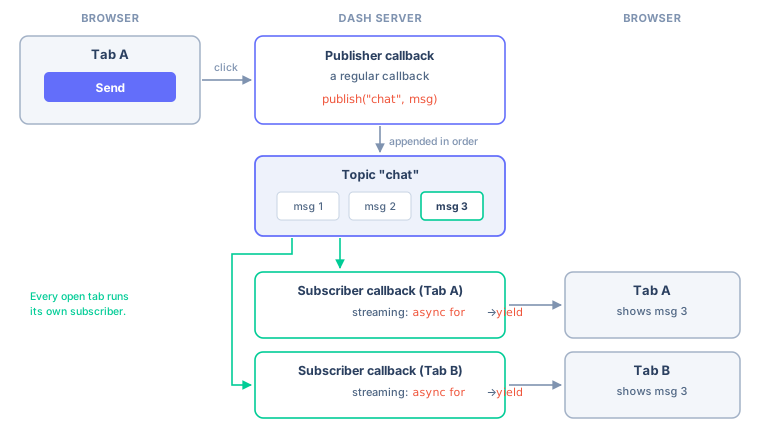
Before shared storage, connecting one callback’s action to another part of the app meant building a chain of callbacks through hidden components. Publish/subscribe replaces that chain with one publisher and one long-lived subscriber.
Iterating a Subscription
A subscription supports both synchronous and asynchronous iteration:
# In an async (streaming) callback:
with ctx.shared_storage.subscribe("prices") as subscription:
    async for message in subscription:
        yield render(message)

# In a synchronous context, such as a background thread:
with app.shared_storage.subscribe("prices") as subscription:
    for message in subscription:
        handle(message)
Use the subscription as a context manager, as shown above, so it’s closed when the callback ends. Otherwise, call subscription.close() yourself.
Iteration ends when the subscription is closed.
Ordering and Replay
Each message published to a topic gets a sequence number that increases monotonically, and a subscriber receives messages in that order.
By default a subscription starts at the topic’s current head, so it receives only messages published from that point on. Messages published before you subscribed aren’t delivered. If an app has to show existing state as well as future updates, read it from the key-value store first and then subscribe, which is the pattern the example above uses.
A subscriber that falls too far behind can miss messages, because each topic keeps a bounded buffer of recent ones. To avoid silently dropping missed messages, have the subscription raise SharedStorageGap:
from dash import SharedStorageGap

try:
    async for message in subscription:
        yield render(message)
except SharedStorageGap:
    # Messages were lost. Re-read the authoritative state.
    yield render_all(ctx.shared_storage.get("current_state"))
Treat SharedStorageGap as lost data, not as the end of the stream. Recovering usually means re-reading current state from the key-value store.
To resume a subscription without a gap, record sequence numbers with iter_with_seq (or aiter_with_seq) and pass the last one you saw as replay_from when you resubscribe:
async for sequence, message in subscription.aiter_with_seq():
    last_seen = sequence
    yield render(message)

# Later, after a reconnect:
subscription = ctx.shared_storage.subscribe("prices", replay_from=last_seen)
Backends
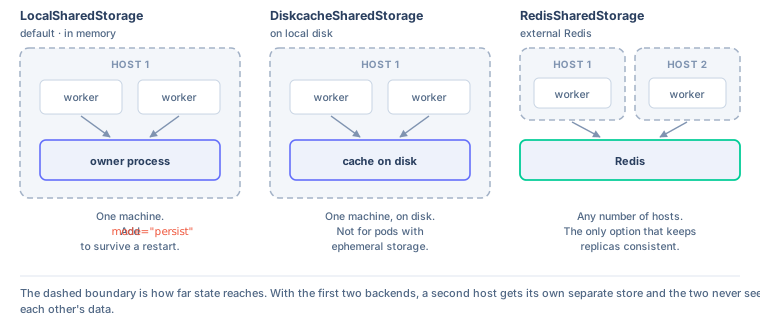
Which backend you use determines how widely state is shared and whether it survives a restart. To choose a backend, you need to determine how many machines your app will run on:
- One process or one container:
LocalSharedStorageis enough. Addmode="persist"if state has to survive a restart. - One host, and you want the data on disk:
DiskcacheSharedStorage. - More than one host or pod:
RedisSharedStorage. Nothing else will keep the replicas consistent.
Pass an instance to shared_storage:
from dash import Dash
from dash import DiskcacheSharedStorage, LocalSharedStorage, RedisSharedStorage

# In-memory, shared across worker processes on one machine.
app = Dash(shared_storage=LocalSharedStorage())

# In-memory, but written to disk so state survives a restart.
# Requires `pip install dash[shared_storage]`.
app = Dash(shared_storage=LocalSharedStorage(mode="persist"))

# Backed by a diskcache.Cache. Single machine only.
app = Dash(shared_storage=DiskcacheSharedStorage(directory="./cache"))

# Backed by Redis. Use this when your app runs on more than one host.
app = Dash(shared_storage=RedisSharedStorage(url="redis://localhost:6379"))

# Turned off, even if the DASH_SHARED_STORAGE environment variable is set.
app = Dash(shared_storage=None)
| Backend | Shared across | Survives restart | Use for |
|---|---|---|---|
LocalSharedStorage |
Worker processes on one machine | Only in a persistent mode | Local development, single-container deployments |
DiskcacheSharedStorage |
All processes on one host | Yes | Single-machine deployments |
RedisSharedStorage |
Every process on every host | Yes | Apps scaled across multiple hosts or pods |
LocalSharedStorage
This backend needs no external service. Worker processes elect one owner per machine, which holds the data and serves it to the others over a local socket. A single-process app is its own owner and pays no socket overhead at all.
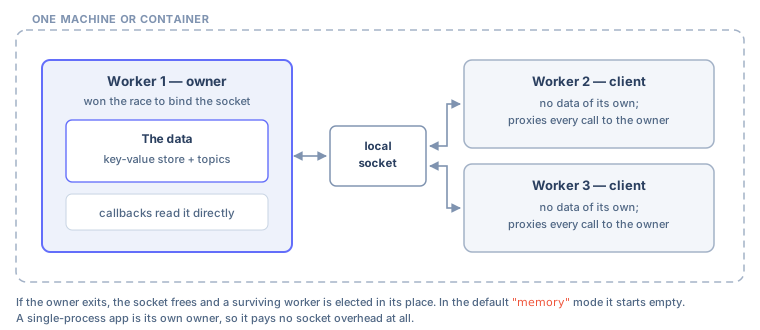
If the owning process dies, a surviving worker takes over. In the default "memory" mode it comes up with an empty store, so use one of the persistent modes if losing the data matters:
mode |
Behavior |
|---|---|
"memory" (default) |
In memory only. Nothing is written to disk. |
"persist" |
Written to disk on every change. Recovered on start and after a new owner is elected. |
"persist-reset" |
Kept in memory, flushed to disk every flush_interval seconds (default 60) and on clean exit. Up to one interval of writes can be lost in a crash. |
app = Dash(shared_storage=LocalSharedStorage(mode="persist", path="./shared-state"))
The persistent modes need an extra dependency. Install it with pip install dash[shared_storage]. Without it, creating a LocalSharedStorage in a persistent mode raises an ImportError. The "memory" mode needs no extra dependencies.
path sets the on-disk location, and defaults to a folder under the user cache directory. Persistence applies to the key-value store only. Published messages are always transient.
LocalSharedStorage is a good fit within a single machine or container, including across multiple Gunicorn workers. Choose something else when your app runs on more than one host, because each host elects its own owner and they don’t see each other’s data.
DiskcacheSharedStorage
Backed by a diskcache cache, this backend is shared by every process on one host and survives a restart. Install it with pip install dash[diskcache].
Pass a directory, or pass an existing cache to reuse the one your background callbacks already use:
import diskcache
from dash import Dash, DiskcacheSharedStorage
from dash.background_callback import DiskcacheManager

cache = diskcache.Cache("./cache")
app = Dash(
    background_callback_manager=DiskcacheManager(cache),
    shared_storage=DiskcacheSharedStorage(cache=cache),
)
Don’t use this backend when your app runs on several hosts or in several pods, or where the disk is ephemeral. Each replica gets its own cache.
RedisSharedStorage
Backed by Redis, this is the backend for apps that run on more than one host, for example behind a load balancer or scaled across pods. Install it with pip install dash[redis].
Pass a url, or pass an existing client to reuse a connection pool:
import os
from dash import Dash, RedisSharedStorage

app = Dash(shared_storage=RedisSharedStorage(url=os.environ["REDIS_URL"]))
url defaults to the REDIS_URL environment variable, then to redis://localhost:6379. A client you pass in has to return bytes, which is the redis-py default (decode_responses=False).
Deployment
Dash Enterprise
Use RedisSharedStorage pointed at a Redis instance. You can attach a Redis service to your app in Dash Enterprise by opening your app settings, selecting Services, selecting Add Redis, then selecting Add and Restart. The modal contains code that instantiates the connection for you to copy into your app. For more information, see Redis Database.
If your app already runs background callbacks with the Celery manager, it has a Redis instance already. You can point shared storage at the same one rather than provisioning a second, either by passing the same URL or by reusing the client:
import os
import redis
from dash import Dash, RedisSharedStorage

client = redis.Redis.from_url(os.environ["REDIS_URL"])
app = Dash(shared_storage=RedisSharedStorage(client=client))
Shared storage namespaces its own keys, so it won’t collide with the keys Celery uses. Change the namespace with key_prefix if you want them separated further.
Related Topics
- Streaming Callbacks for subscribing to a topic and pushing updates to the browser.
- Sharing Data Between Callbacks for the other ways to share data, including
dcc.Store. - Background Callbacks for long-running work that returns a single result.